Using POSSE to improve the Indie Web
I recently added a bookmarks section to this blog, as a place for sharing interesting websites I find on the Internet, without the need for publishing a full post about it.
This type of post turned out to be a good reason for me to implement the POSSE (Publish on your Own Site, Syndicate Elsewhere) approach in them, since their content is small enough to fit into Mastodon and Bluesky posts.
What is POSSE
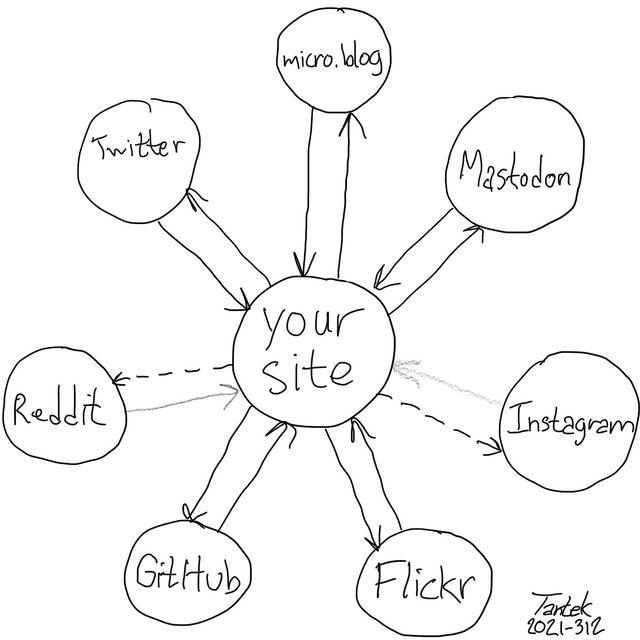 Image from POSSE website
POSSE is an abbreviation for Publish (on your) Own Site, Syndicate Elsewhere, the practice of posting content on your own site first, then publishing copies or sharing links to third parties (like social media silos) with original post links to provide viewers a path to directly interacting with your content.
This is an answer to combat the walled garden content from social networks. My content belongs to me, it is first and foremost hosted by me, and only then shared on other platforms.
This way, the canonical URLs to my content are on my domain. It makes it clear to trackers and other crawlers the ownership of the content using proper semantics.
Implementing POSSE in a Hugo blog
This blog is using Hugo and my bookmarks posts have their own archetypes, so I just had to add a syndication field to track where bookmarks are syndicated:
+++
date = '{{ .Date }}'
draft = true
title = '{{ replace .File.ContentBaseName "-" " " | title }}'
link = ''
tags = []
syndication = []
+++
I also added Microformats to my Bookmark Template, more specifically the h-entry microformat classes:
| Element | Microformat Class | Purpose |
|---|---|---|
<article> |
h-entry |
Entry container |
| Title | p-name |
Entry name |
| External link | u-bookmark-of |
URL being bookmarked |
| Content | e-content |
Commentary |
| Date | dt-published |
ISO 8601 datetime |
| Permalink | u-url |
Canonical URL |
| Author | p-author h-card |
Attribution |
| Tags | p-category |
Categories |
| Syndication links | u-syndication |
Where syndicated |
Now, every time I post my content in other places that support syndication, I can add the post’s URL to my post frontmatter and they are semantically linked.